Transforms
Transforms augment and preprocess patches after extraction and filtering. wsistream includes pathology-specific transforms that are not available in general-purpose libraries. For standard vision augmentations, use albumentations through the included wrapper.
All transforms operate on numpy arrays (H, W, 3) and preserve uint8 dtype, unless they are explicitly a normalization step (which outputs float32 and should be last in the chain).
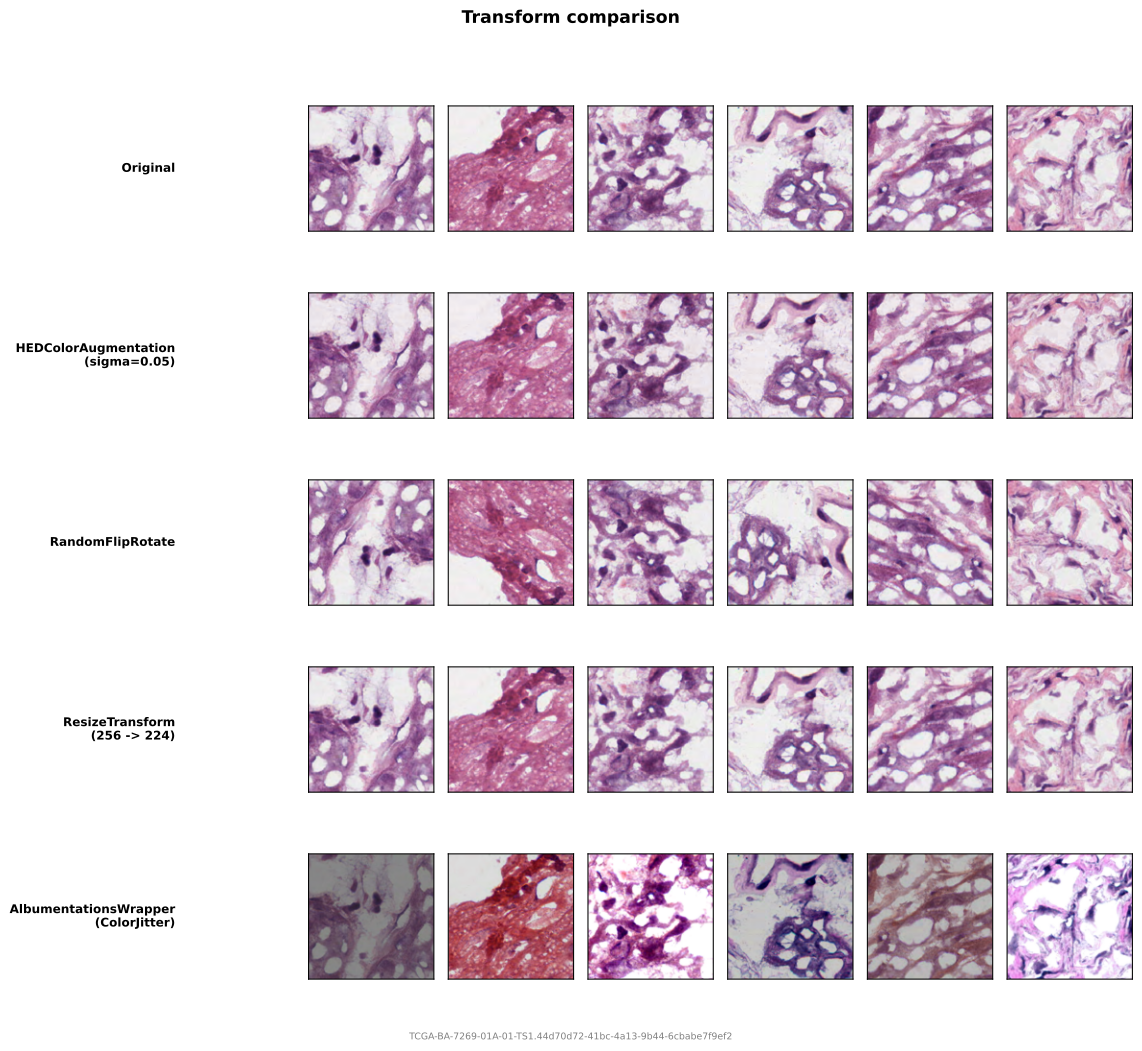
Pathology-specific
HEDColorAugmentation
Decomposes the image into Hematoxylin, Eosin, and DAB stain channels, perturbs each channel i as s_i' = alpha_i * s_i + beta_i, and converts back to RGB. This simulates staining variation across labs and scanners. The perturbation was introduced by Tellez et al. (2018), which draws alpha and beta per channel from two uniform distributions; Tellez et al. (2019) reports the intensity ranges. Also used by Midnight (Karasikov et al., 2025).
from wsistream.transforms import HEDColorAugmentation

transform = HEDColorAugmentation(
    sigma=0.05,       # alpha ~ U(1 - sigma, 1 + sigma); 0.05 = Tellez "light", 0.2 = "strong"
    sigma_bias=None,  # beta ~ U(-sigma_bias, sigma_bias); None reuses sigma
    seed=None,        # random seed
)
One sigma drives both terms, as defined by Tellez et al. (2018) and also implemented by StainTools and HistomicsTK. The RGB/HED conversion follows the paper's additive-epsilon equations directly, without clamping stain concentrations. The perturbation is applied in optical-density space, so sigma needs no rescaling. Set sigma_bias to decouple the two terms, or to 0.0 to drop the additive term.
Alternative: albumentations.HEStain
HEDColorAugmentation always uses skimage's fixed HED deconvolution matrix, so it perturbs stain channels defined by a global average rather than by your slide's actual stain vectors. A.HEStain can estimate the stain matrix from the image when method="macenko" or method="vahadane"; its default method="random_preset" instead picks from predefined matrices. Prefer it when stain vectors vary a lot across your cohort; see Stain augmentation via albumentations below.
NormalizeTransform
Per-channel mean/std normalization. Converts uint8 to float32. Should be the last transform in a chain since it changes the dtype.
Requires explicit mean and std -- there are no defaults. Choose values to match your model's expected normalization.
from wsistream.transforms import NormalizeTransform

# ImageNet normalization
transform = NormalizeTransform(mean=(0.485, 0.456, 0.406), std=(0.229, 0.224, 0.225))

# Symmetric normalization (maps [0, 255] to [-1, 1])
transform = NormalizeTransform(mean=(0.5, 0.5, 0.5), std=(0.5, 0.5, 0.5))
Note
If your training code handles normalization (e.g., inside the model or the DataLoader collate function), you do not need this here. Avoid double-normalizing.
Utility transforms
ResizeTransform
Resizes to a square target size. Useful when the extraction patch size (e.g., 256) differs from the model input size (e.g., 224).
import cv2
from wsistream.transforms import ResizeTransform

transform = ResizeTransform(
    target_size=224,                     # output width and height
    interpolation=cv2.INTER_LINEAR,      # OpenCV interpolation flag
)
RandomFlipRotate
Random horizontal/vertical flips and 90-degree rotations. Standard for pathology since tissue orientation is arbitrary.
from wsistream.transforms import RandomFlipRotate

transform = RandomFlipRotate(
    p_hflip=0.5,    # probability of horizontal flip
    p_vflip=0.5,    # probability of vertical flip
    p_rot90=0.5,    # probability of 90-degree rotation (1, 2, or 3 quarter turns)
    seed=None,       # random seed
)
Standard augmentations via albumentations
For augmentations like color jitter, Gaussian blur, grayscale conversion, and solarization, use AlbumentationsWrapper:
import albumentations as A
from wsistream.transforms import AlbumentationsWrapper

transform = AlbumentationsWrapper(A.Compose([
    A.HorizontalFlip(p=0.5),
    A.VerticalFlip(p=0.5),
    A.RandomRotate90(p=0.5),
    A.ColorJitter(brightness=0.4, contrast=0.4, saturation=0.2, hue=0.1, p=0.8),
    A.ToGray(p=0.2),
    A.GaussianBlur(blur_limit=7, sigma_limit=(0.1, 2.0), p=0.5),
    A.Solarize(threshold_range=(0.5, 0.5), p=0.2),  # 128/255, normalised
]))
Seeding across DataLoader workers
Albumentations initialises its RNG state at construction time. Under fork-based DataLoader workers the constructed object is copied in memory, so all workers share the same initial state and replay identical augmentations. AlbumentationsWrapper prevents this: it owns an RNG that PatchPipeline reseeds per worker and pushes a derived seed into albumentations via set_random_seed. Set seed on PatchPipeline, not on the wrapper. set_random_seed was added in albumentations 1.4.21 (absent in 1.4.18); with anything older the wrapper warns.
Stain augmentation via albumentations
Albumentations (>= 2.0) includes a built-in HEStain transform that decomposes the image into stain concentration channels, randomly perturbs them, and reconstructs. Its default method="random_preset" draws from predefined stain matrices; pass method="macenko" or "vahadane" to estimate the matrix from each image. This is a more principled alternative to HEDColorAugmentation for simulating staining variation across labs and scanners.
import albumentations as A
from wsistream.transforms import AlbumentationsWrapper

# Macenko-based stain augmentation
transform = AlbumentationsWrapper(A.Compose([
    A.HEStain(
        method="macenko",
        intensity_scale_range=(0.7, 1.3),   # multiplicative perturbation per stain channel
        intensity_shift_range=(-0.2, 0.2),  # additive perturbation per stain channel
        augment_background=False,
        p=0.5,
    ),
]))

# Vahadane-based (better structure preservation)
transform = AlbumentationsWrapper(A.Compose([
    A.HEStain(method="vahadane", p=0.5),
]))

# Random preset (fastest -- uses predefined stain matrices, no per-image SVD)
transform = AlbumentationsWrapper(A.Compose([
    A.HEStain(method="random_preset", p=0.5),
]))
The two key parameters controlling augmentation strength are:
intensity_scale_range(default(0.7, 1.3)): multiplicative scaling per stain channel. Narrower range = subtler color variation.intensity_shift_range(default(-0.2, 0.2)): additive shift per stain channel. Controls baseline staining variation.
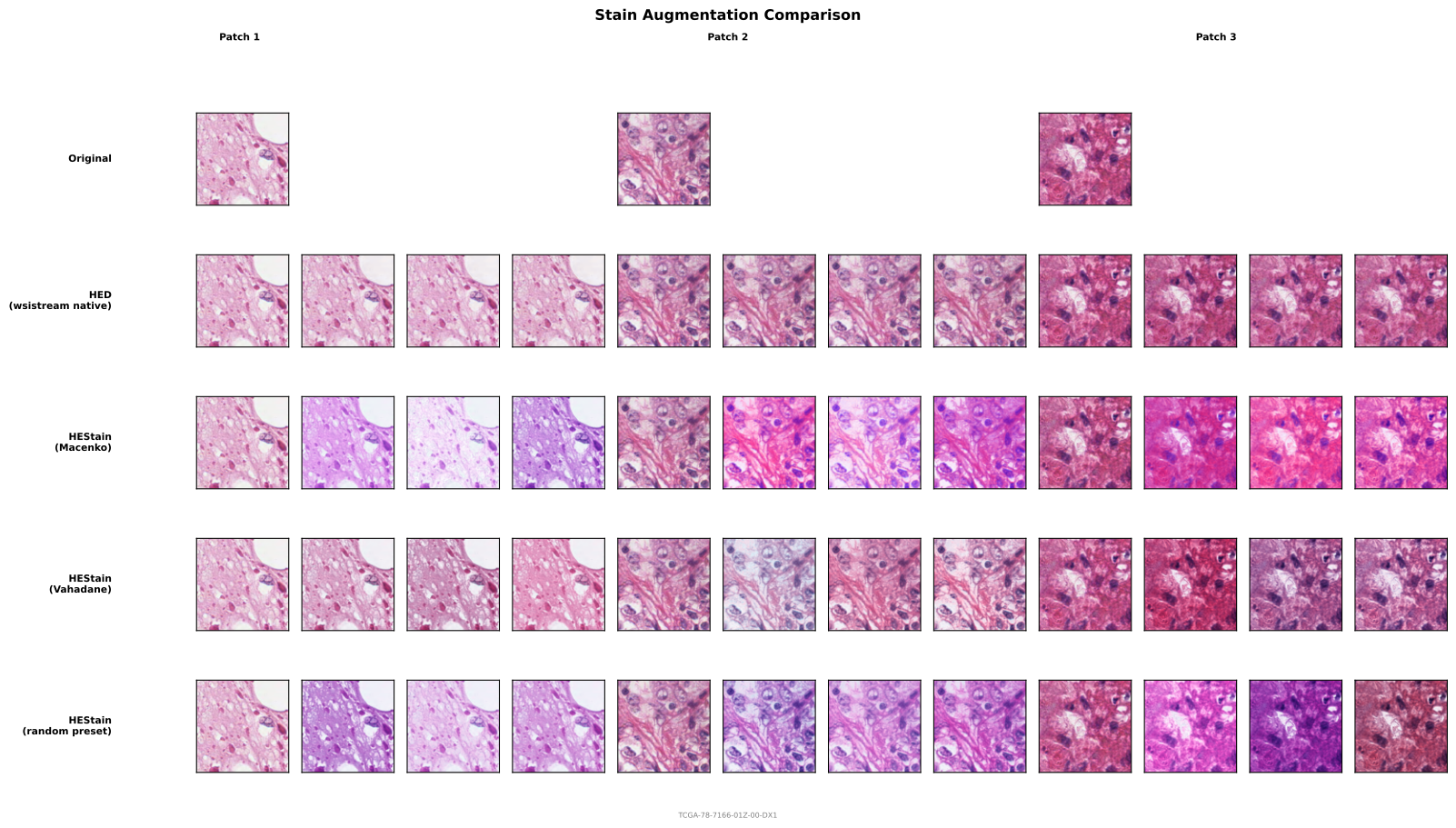
Composing transforms
Use ComposeTransforms to chain multiple transforms. They are applied in order.
from wsistream.transforms import (
    ComposeTransforms, HEDColorAugmentation, RandomFlipRotate,
    ResizeTransform, NormalizeTransform,
)

pipeline_transforms = ComposeTransforms(transforms=[
    HEDColorAugmentation(sigma=0.05),
    RandomFlipRotate(),
    ResizeTransform(target_size=224),
    NormalizeTransform(mean=(0.485, 0.456, 0.406), std=(0.229, 0.224, 0.225)),  # last
])